It’s the last day of the month. Finance is chasing three spreadsheets that don’t quite agree, the warehouse is counting boxes by hand, and someone in sales has just promised a customer a delivery date nobody checked. Nothing has actually crashed. Everything is simply slower and more stressful than it should be.
If that sounds familiar, you’ve probably started wondering how to select an ERP system. And you’re right to be careful. A good pick quietly saves time every single day. A bad one eats your budget, drags out for months, and ends up as software your team works around instead of with.
So let’s keep this practical. Below are five steps for choosing well, a quick way to compare your options, and a simple method for checking your ERP ROI after launch, so you’re working from numbers instead of gut feeling.
Key Takeaways
- Decide what “success” means in numbers before you speak to any vendor.
- Choose a partner who has solved problems like yours, not just one with a long feature list.
- Pick a platform that plays nicely with the tools you already use.
- Configure first. Customize only when it really earns its place.
- Think about people early, because your ERP ROI depends on whether they use the thing.
Standard, Custom, or Hybrid: Which ERP Approach Fits You?
Most companies choose between a ready-made standard ERP, a fully custom-built one, or a hybrid that starts standard and is then configured. Standard is fastest, custom fits best but costs most, and hybrid balances the two for many growing businesses.
Before you compare vendors, work out which road you’re on. This one choice shapes your budget, your timeline, and how much freedom you’ll have later.
| Factor | Standard (Ready-Made) | Custom-Built | Hybrid (Standard + Configuration) |
|---|---|---|---|
| Time to go live | Fastest | Slowest | In between |
| Upfront cost | Lower | Highest | Moderate |
| Fit to your processes | Good for common workflows | Exact fit | Very good |
| Upgrades | Handled by the vendor, but still need testing | You maintain everything | Mostly handled by the vendor |
| Flexibility | Limited to built-in options | Unlimited | High, through low-code add-ons |
| Best for | Fairly standard processes | Unusual or highly specialized operations | Most growing and mid-sized companies |
| Biggest risk | Bending your processes to fit the software | Budget and schedule overruns | Over-configuring without a plan |
Leaning toward custom? Our guide to custom ERP software development for small and medium enterprises covers when it’s worth the extra spend.
What Is an ERP System?
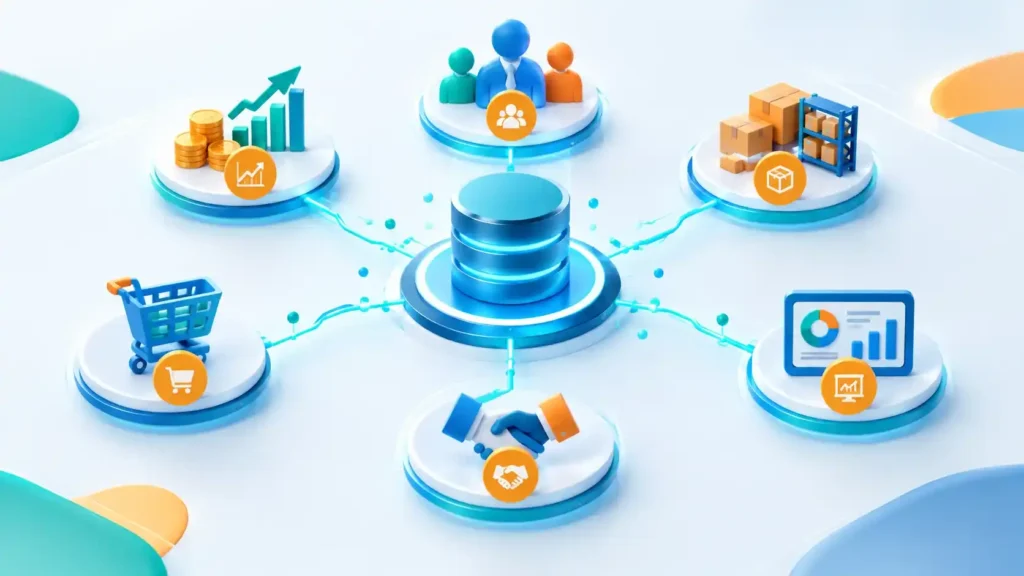
An ERP system is business software that brings finance, HR, inventory, and procurement into one shared database. Everyone sees the same up-to-date numbers instead of juggling separate tools and spreadsheets.
ERP stands for enterprise resource planning, which sounds far grander than it is. Think of it as one shared notebook for the whole company. Record a sale once, and stock levels, invoices, and financial reports all update on their own. Less retyping, fewer slip-ups, and managers who can finally trust the figures in front of them.
Step 1: Define Your Goals and ERP ROI Targets
Before comparing vendors, write down the problems you want to solve and attach a measurable target to each. Clear goals keep the selection honest and give you a baseline for measuring ERP ROI later.
Plenty of ERP projects start with “we need a new system.” That’s a fine feeling, but a terrible goal. Try “we want to close the books in four days instead of ten” instead. Now everyone knows what winning looks like.
Pick three to five goals and put a number on each. Maybe you want to cut the hours lost to manual data entry, shorten the gap between an order and getting paid, trim the stock sitting unused in the warehouse, or get monthly reports out faster.
Then, and people skip this, write down where you are today. Without a starting point you can’t prove anything improved, and your ERP ROI turns into a matter of opinion.
Step 2: Choose a Partner With Real Industry Experience
Pick an ERP partner who has already solved problems like yours. Deep experience in your sector means tested processes, fewer surprises, and a quicker route to results.
A vendor who knows your industry already understands its quirks: the compliance rules, the reporting habits, the busy seasons. That’s a lot of expensive lessons you don’t have to learn on your own project.
When you build your shortlist, don’t just watch the demo. Ask questions like these:
- Which clients in our sector have you worked with, and can we talk to them?
- What did their timeline and final cost really look like?
- Who supports us after go-live, and how fast do they answer?
Good ERP vendor selection is mostly about evidence, so ask for proof instead of promises. For context, we build ERP solutions for higher education, the public sector, non-profits, and professional services at Diginatives, because those worlds run very differently from one another.
Step 3: Match the Technology to Where Your Business Is Heading
Your ERP should support your plans for the next few years, not just today’s setup. Look for a modular, integration-friendly platform that connects with other tools and grows without a rebuild.
Your company won’t look the same in three years. Maybe a new sales channel appears, or a new market, or a new regulation lands on your desk. An ERP that can’t bend turns each of those into a headache.
So ask plainly. Does it have open APIs so other tools can plug in? Can you add or swap modules without shaking the core? What happens if your transaction volume doubles?
A rigid system can look cheaper on day one and cost far more when you’re forced to replace it. And if your needs are genuinely unusual, our custom software development services can help you weigh a tailored build against an off-the-shelf platform.
Step 4: Configure First, Customize Only When It Counts
Stay close to the standard system and adjust it through configuration, low-code, or no-code tools. This keeps costs down, avoids upgrade trouble, and lets business users make changes without waiting on developers.
No ERP will match every process out of the box, and that’s okay. The smart move is to keep the core standard and change only what gives you a real edge.
Here’s a rule that saves a lot of money: if a process is weak, fix the process before you touch the software. Too many teams pay to copy an old, clumsy workflow into a shiny new system. Customize only where it creates a genuine advantage, lean on low-code or no-code tools your non-technical staff can adjust safely, and write down every customization so it can be re-tested at each upgrade.
Heavy customization is one of the most common reasons budgets swell and timelines slip. Treat every custom request as something you’ll pay for again at every upgrade.
Step 5: Plan for People, Training, and User Experience
An ERP only pays off if people use it. Build a change-management plan with early communication, role-based training, and a simple interface so your team adopts the system quickly.
A new ERP changes how people do their jobs every day, so a little resistance is normal. It’s also the top reason good systems underperform.
What tends to help is surprisingly simple. Let future users see demos and test the system early so they feel heard. Name a friendly champion in each department. Train people by role instead of putting everyone in one long session. Then, in the first 90 days, listen for friction and fix it quickly. Software with a clean, easy-to-learn interface makes all of this easier.
The best system on paper loses to a decent one that everyone actually uses.
How to Measure ERP ROI
ERP ROI compares total benefits with total costs over time. Track savings from efficiency and fewer errors, and count every cost, including licenses, implementation, training, and ongoing support.
The maths is refreshingly simple:
ERP ROI (%) = (Total benefits − Total costs) ÷ Total costs × 100
On the benefit side, count hours saved on manual work, fewer errors and less rework, lower stock-holding costs, faster invoicing and month-end closing, and better decisions made sooner. On the cost side, be honest and include everything: licenses or subscriptions, implementation and data migration, integrations, training and support, and future upgrades.
Check your figures at 6 and 12 months against the baseline from Step 1. Returns rarely show up in the first few weeks, so give it a realistic window before you judge.
Common Mistakes When Choosing an ERP
The most common mistakes are choosing by price alone, skipping goal setting, over-customizing, treating training as an afterthought, and ignoring hidden costs. Avoiding these protects both your budget and your adoption rate.
- Picking the cheapest option without looking at the total cost of ownership
- Letting a single department make the call alone
- Customizing heavily just to copy old, inefficient habits
- Leaving training until the week before launch
- Not testing data migration before go-live
Final Thoughts
Knowing how to select an ERP system comes down to clear goals, an experienced partner, a flexible platform, controlled customization, and strong user adoption. Follow these five steps and ERP ROI becomes something you measure, not something you hope for.
Choosing an ERP is a business decision first and a technology decision second. Get the goals, the partner, and the people right, and the software has a real chance of paying for itself.
If you’d like a hand defining your requirements or building a system around them, have a look at our IT and software services or [talk to the Diginatives team →].
AI – Powered Products. Measurable Impact.
And if your business also relies on connected devices and sensors, our overview of the future of IoT shows how the two worlds can fit together.
Frequently Asked Questions
Short answers to common questions about ERP selection, technologies, outsourcing, and timelines.
How do I choose the right ERP system?
Set measurable goals first, shortlist vendors with experience in your industry, check how well the platform integrates and adapts, prefer configuration over heavy customization, and plan user training from the start.
What is ERP?
ERP is software that connects core business functions such as finance, HR, inventory, and procurement in one shared system, so teams work from the same accurate data.
What is the difference between standard and custom ERP?
Standard ERP is ready-made and quicker to launch. Custom ERP is built around your exact processes but costs more and takes longer. Many businesses land on a hybrid of the two.
Which programming languages are used for ERP development?
Java, .NET, and Python are common choices. Some platforms use their own languages, such as SAP’s ABAP, and Odoo is built mainly on Python.
Is outsourcing ERP development a good idea?
It can be, especially if you lack in-house expertise, since an experienced partner brings proven methods and can shorten delivery. Compare total cost and support terms first instead of assuming outsourcing is always cheaper.
How long does an ERP implementation take?
It depends on company size, complexity, and how much you customize. Lightly configured standard systems go live faster than heavily customized ones, so ask vendors for timelines from comparable clients.
Discover more from Diginatives
Subscribe to get the latest posts sent to your email.