Most folks searching for a python tutorial meet the same wall. They locate a page with forty themes and copy a few lines of code and cannot develop a program alone. This python tutorial is distinct. It teaches python programming for beginners in a logical order, points out where new learners commonly get stuck, and helps you determine if you need a python instructor, a university course or a python bootcamp.
By the end of this python course you will know what Python is, you will have written and run your own code, and you will have a clear 8 week plan for how to learn Python without spending months.
So what is Python ?
What is Python? Python is an object-oriented programming language designed to have an easy-to-read syntax. Python is a high-level, general purpose programming language invented by Guido van Rossum and initially released in 1991. Its syntax is concise and comprehensible so you spend less time arguing with the language and more time solving the actual problem.
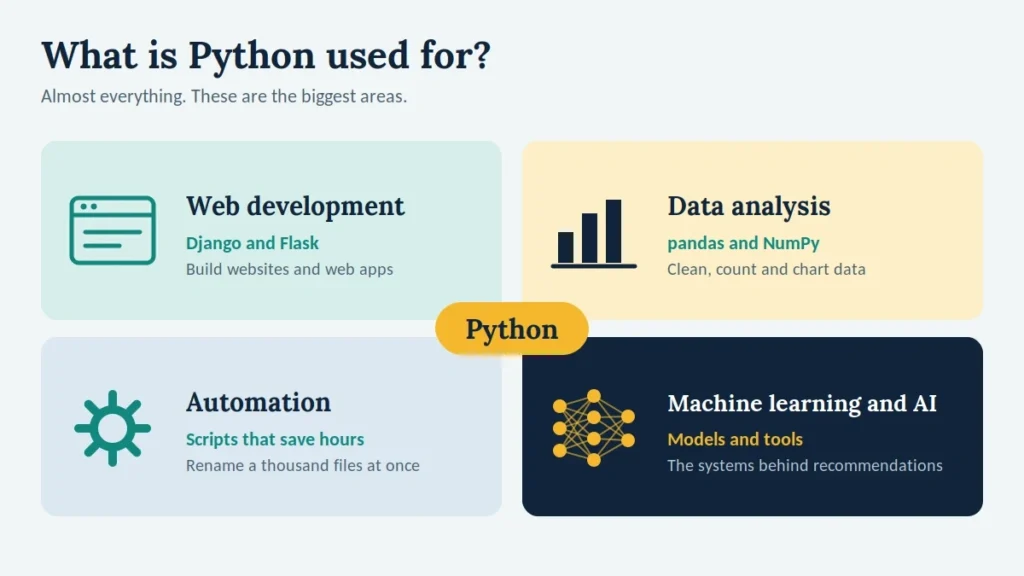
That simplicity is why Python grew into so many fields:
- Flask and Django for web design
- Data Analysis Using NumPy and pandas
- Automating routine office and server tasks
- artificial intelligence and machine learning
So when folks ask what Python is used for, the honest response is just about everything—from a script to rename a thousand files to the models underpinning recommendation engines. A decent python tutorial will teach you range early, and this python tutorial does.
How to Pick a Good Python Tutorial
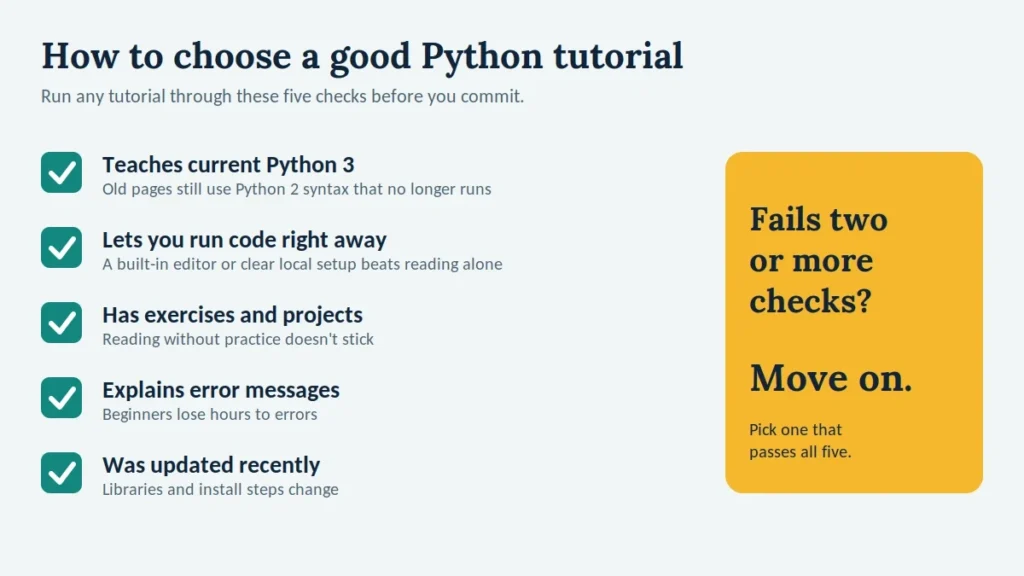
Not every Python tutorial is worth your time. Before you commit, check five things:
- It teaches modern Python 3. Old python instructional pages still teach Python 2 syntax that no longer runs.
- You may execute code right now. A python tutorial with a built-in editor or a clear local setup keeps you practicing instead of merely reading.
- It comprises exercises and projects. Lessons without practice do not stick.
- It tells about error messages. Beginners spend hours on mistakes. So any python tutorial that describes mistakes is worth more.
- It was updated not long ago. Libraries and installation steps change.
Use this list to judge this python tutorial too. If a python tutorial fails two or more criteria, move on.
Python Tutorial Step 1: Install Python and Run Your First Program
Setting up for this python tutorial takes about ten minutes.
- Download the latest Python 3 release from python.org.
- On Windows, tick “Add Python to PATH” before installing.
- Open a terminal and run python –version to confirm it worked.
- Install a code editor such as VS Code or PyCharm Community Edition.
Create a file named hello.py and add one line:
print("Hello, Python!")Run it with python hello.py. That is your first program, and every later example in this python tutorial follows the same loop: write, run, read the result, fix, repeat.
How This Python Tutorial Is Different
Reading about python programming does not teach it. Typing does. Each section below includes a small example that you should type out yourself instead of pasting. When something breaks, and it will, read the error message from the bottom up. The last line names the problem, and the lines above show where it happened. Most python tutorial pages hand you finished code. Here you build it yourself, so treat this python tutorial as a workbook, not a book.
Step 2: Python Basics, Five Ideas Everything Else Builds On
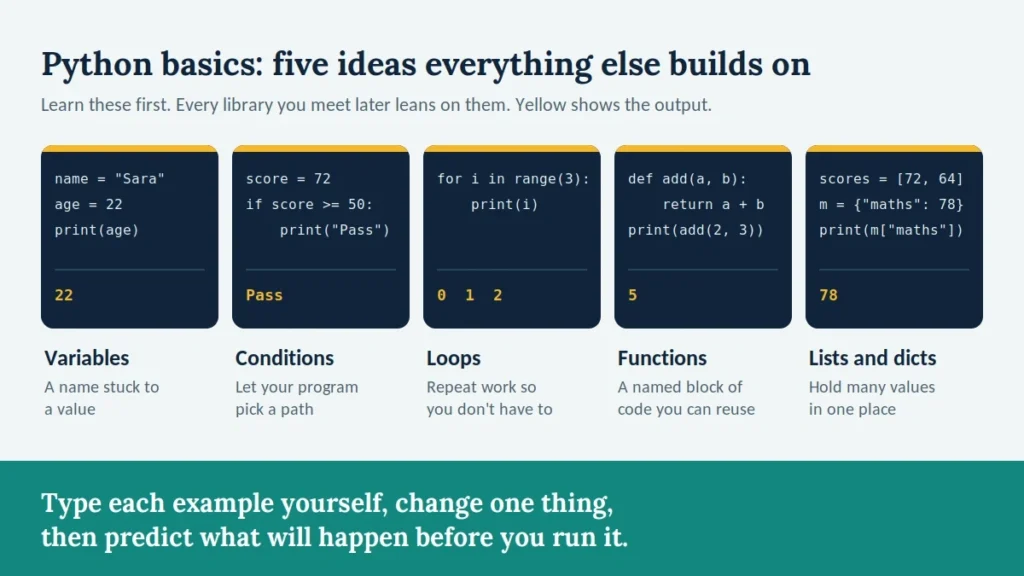
Solid python basics come down to five ideas. Learn these python basics properly and every library you meet later will make more sense.
Variables and Data Types in Python
A variable is a name attached to a value, and Python works out the type on its own.
name = "Sara"
age = 22
price = 4.99
is_student = True
Those are a string, an integer, a float, and a boolean. Use type(age) to check any value. The classic beginner error in Python is mixing types, such as adding a string to a number. Python raises a TypeError, and the fix is usually converting with int(), float(), or str().
Conditions in Python
Conditions let a program choose a path. Indentation in Python matters here, because Python uses spaces, not braces, to mark which lines belong together.
score = 72
if score >= 50:
    print("Pass")
else:
    print("Try again")
Loops in Python
A loop repeats work so you do not have to. Use for when you know how many times, and while when you repeat until something changes.
for day in range(1, 8):
print("Day", day)Functions in Python
A function is a named, reusable block of code. Writing functions early is the habit that separates tidy programs from tangled ones.
def greet(name):
return "Welcome, " + nameLists and Dictionaries
A list keeps ordered items, while a dictionary stores labelled values. Most real data you handle in Python, from spreadsheet rows to web responses, ends up in one of these two shapes, since everything in Python is an object. These python basics appear in every python tutorial for a reason: nothing else works without them.
Step 3: A Ten-Minute Grade Calculator
Now combine all five ideas in one small program.
marks = {"maths": 78, "science": 64, "english": 85}
average = sum(marks.values()) / len(marks)
print(f"Average: {average:.1f}")
Change the subjects, add a condition that prints “Pass” or “Fail”, then wrap the whole thing in a function. Extending a working program is where python programming for beginners turns from reading into real skill. It is also the step that most python tutorial pages leave out.
Common Mistakes in Python Programming for Beginners
Many python tutorials skip this part, yet it saves the most time.
- Copy-pasting without understanding. Type the code yourself, change one thing, and predict the result.
- Ignoring error messages. Python tells you the file, the line, and the problem. Read it before searching.
- Switching resources every week. Finish one python tutorial or course before starting another.
- Skipping projects. Lessons teach syntax, but only projects teach problem solving.
- Getting indentation wrong. One misplaced space in Python can change what your code does.
How to Learn Python: A Realistic Eight-Week Plan
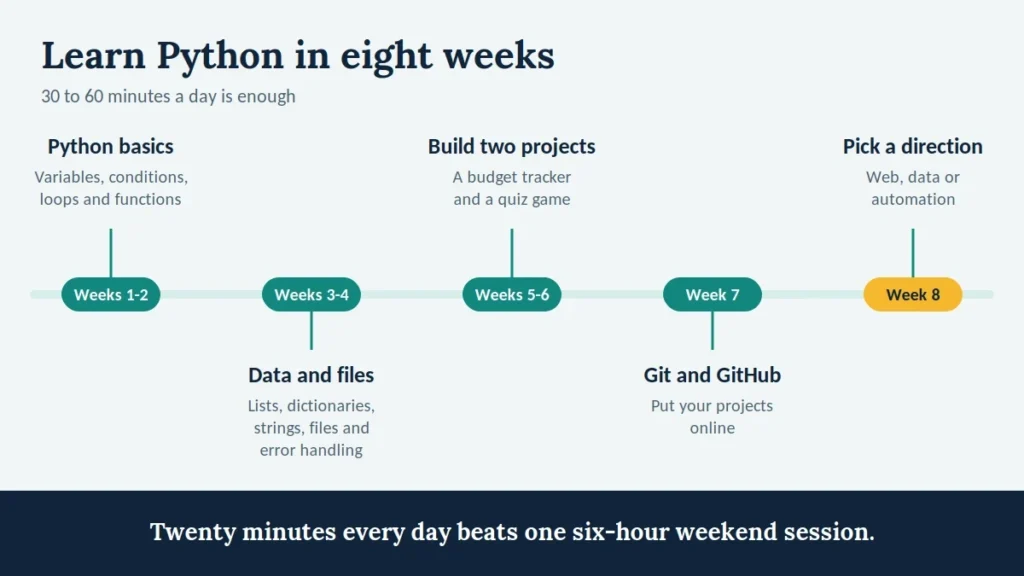
If you are wondering how to learn Python without burning out, use this schedule and give it 30 to 60 minutes a day.
- Weeks 1 and 2: Python basics, meaning variables, conditions, loops, and functions.
- Weeks 3 and 4: Lists, dictionaries, strings, files, and error handling.
- Weeks 5 and 6: Build two small python programming projects, such as a budget tracker and a quiz game.
- Week 7: Learn Git basics and put your projects on GitHub.
- Week 8: Pick a direction, either web, data, or automation, and start its first tutorial.
How to learn Python quickly is really a question about consistency. Twenty minutes every day beats one six-hour weekend session. AI assistants can explain an error or suggest another approach, but write the first attempt yourself. If a tool writes your code, you learn to read answers instead of finding them. That is the honest answer to how to learn Python in a way that lasts.
Python Tutor: Free Visual Tool or Human Teacher?
The phrase python tutor means two different things, and both are worth knowing.
- Python Tutor the website. This free tool runs your code one line at a time and draws variables, objects, and function calls as a diagram. It is excellent when a loop or list behaves in a way you cannot explain, because you can step forward and backward through the execution. Pair it with any python tutorial for beginners and hard ideas in Python become visible.
- A human python tutor. A personal tutor is worth paying for when you understand lessons but freeze when you build alone, or when an exam is close. If you are still working out how to learn Python, a good python tutor reviews your code, not just your answers, and asks you to explain your reasoning. Look for someone who assigns small projects and teaches debugging instead of solving every problem for you.
For most self-taught learners, the sensible path is the free visual tool first, then a paid python tutor only if you stay stuck for more than a week.
Uni Python: What to Expect at University
Many people meet python programming for the first time at university. A typical uni Python unit moves faster than a self-paced python tutorial. Week one covers variables and functions. By week five you may be writing recursion and working with lists of lists, and by the end you are asked for object-oriented design and basic algorithm analysis.
Some practical advice for anyone taking uni Python:
- Start your uni Python assignments early. Marking is often automated, so one wrong output format can cost marks.
- Go to lab sessions. Tutors there spot mistakes in minutes.
- Practice beyond the syllabus. A uni Python course rarely teaches Git, virtual environments, or reading documentation, so pick those up on your own.
If your uni Python course feels too fast, revisit the python basics above, then return to your lecture notes. That is a practical way to learn Python alongside lectures. A short python tutorial session before each lecture often helps more than rereading slides afterwards.
Python Bootcamp: When It Is Worth the Money
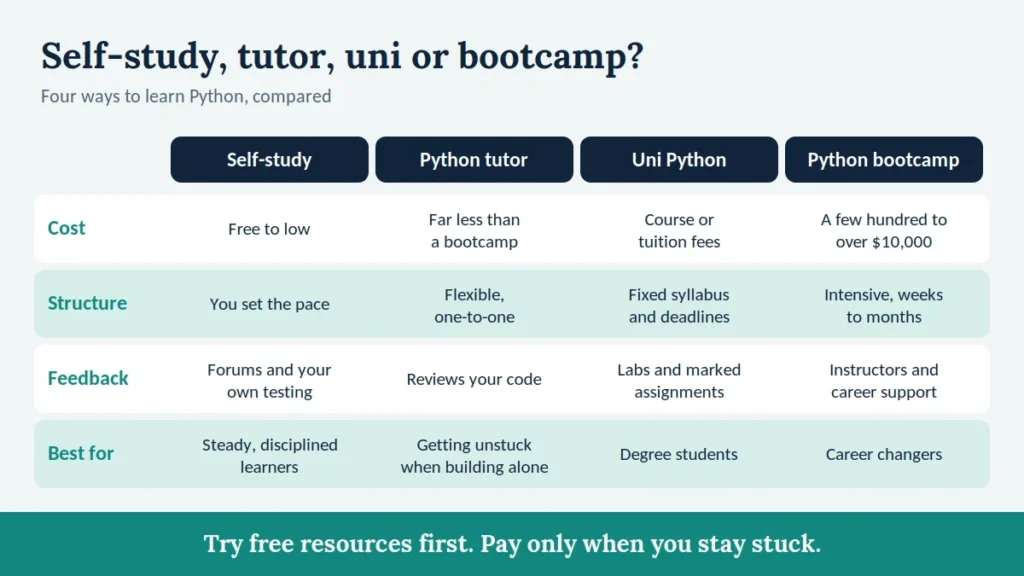
A python bootcamp is a structured, intensive program that runs from a few weeks to several months. Prices range from a few hundred dollars for a self-paced course to well over ten thousand dollars for an immersive, instructor-led program with career support.
A python bootcamp makes sense if:
- You want a career change and need structure, deadlines, and feedback.
- You have struggled to stay consistent with self-study.
- The program publishes honest placement data and shows real student projects.
A python tutor costs far less than a python bootcamp and gives one-to-one feedback. Skip a python bootcamp if you only need Python for automation or study. Free resources plus the plan in this python tutorial will take you a long way. Before paying for any python bootcamp, ask three questions: who teaches it, what do graduates build, and can you try a lesson first?
After This Python Tutorial: What to Learn Next
Once you can build small programs, choose one path for your python programming and stay on it for two months:
- Automation in Python: file handling, APIs, and scheduling scripts.
- Data: pandas, NumPy, and charts with Matplotlib.
- Web development in Python: Flask or Django, plus basic HTML.
Revisit the python basics whenever a new library confuses you, and read the official documentation alongside every python tutorial you follow, because it teaches you to find answers yourself. If you want Python skills turned into real software, the team at Diginatives builds custom applications and AI automation for businesses.
Python Tutorial FAQ
What is the best python tutorial for beginners?
The best python tutorial is the one you finish. Pick one with current Python 3, exercises, and projects, then follow it in order.
What are the python basics to learn first?
Start with variables, conditions, loops, functions, and lists.
What is Python used for in real jobs?
Web apps, data analysis, automation, and AI.
Is python programming for beginners hard?
Not with steady practice. Most difficulty comes from skipping projects.
Is uni Python harder than learning alone?
It moves faster, but self-study lets you set the pace.
Do I need maths for python programming?
Basic arithmetic is enough to start. Data science and machine learning need more, and you can learn that later.
Is a python bootcamp better than self-study?
Not necessarily. A python bootcamp adds structure and feedback, while self-study costs less. The best choice depends on your budget and discipline.
Discover more from Diginatives
Subscribe to get the latest posts sent to your email.