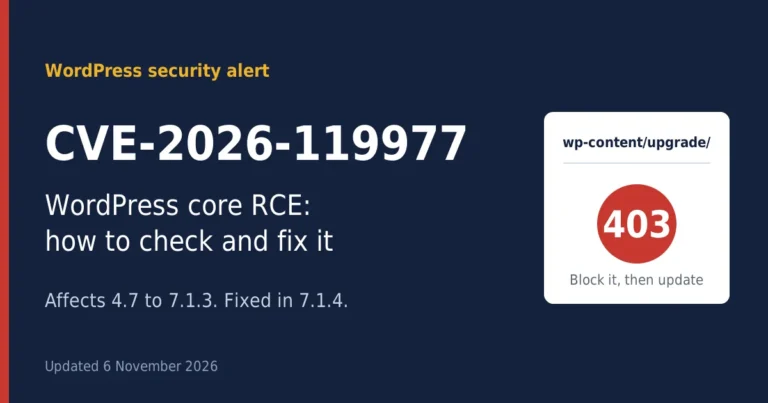
CVE-2026-119977 is a hole in the WordPress core. While a core update is unpacking, someone who isn’t even logged in can try to get your server to run their code. Anything from 4.7 up to 7.1.3 is exposed. What you need to do: update to 7.1.4 (7.0.8 if you’re stuck on the 7.0 branch), block the wp-content/upgrade folder from the web, and go through your logs from 28 October onward. Plan on twenty minutes a site, give or take.
If you look after even one WordPress site, you’ve probably seen the warnings this week. A bug that only exists while your site is updating itself sounds odd. It is odd. It’s also under attack right now, and CISA has added it to its list of vulnerabilities known to be exploited.
This guide is for the people who actually have to deal with CVE-2026-119977: site owners, freelancers, and agencies juggling a pile of client sites. I’m leaving out exploit details on purpose. You’ll get what the bug is, whether you’re in scope, and what to do, in an order that makes sense.
Key takeaways
- CVE-2026-119977 affects WordPress 4.7 to 7.1.3 during full core updates.
- Update to 7.1.4 or the fixed release for your branch.
- Block wp-content/upgrade at server level when you can.
- Check logs from 28 October, starting with any 200 responses.
- A security plugin alone isn’t enough.
What is CVE-2026-119977?
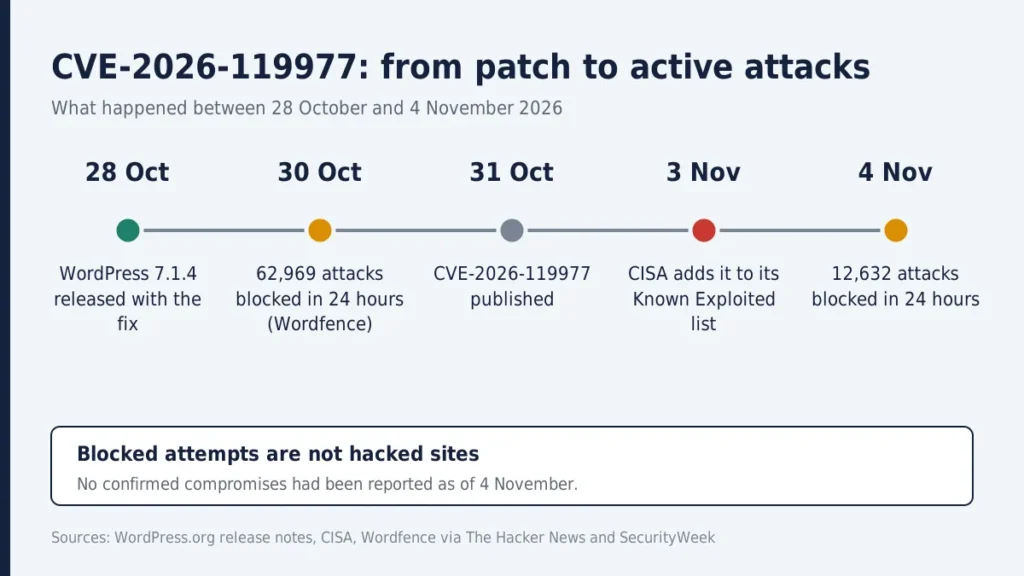
WordPress 7.1.4 came out on 28 October 2026 as a security release. Buried in the notes was a fix for a race condition in the core update process. The CVE number arrived a few days later: it was published on 31 October, and on 3 November CISA put CVE-2026-119977 in its Known Exploited Vulnerabilities catalog.
Here’s the plain version. When WordPress runs a full core update, it unpacks the new files into a temporary folder under wp-content/upgrade. On affected versions that folder had a predictable name, and the staged copy included the installer. For a few seconds it could be reached over the web. If an attacker hits it at the right moment, they may get your server to run their code.
Picture a removal van parked outside your house with the front door propped open. The window is short. But if someone is watching the street, short is enough. Wordfence actually saw scanners polling small groups of sites for hours, apparently waiting for exactly that moment.
Is your site affected by CVE-2026-119977?
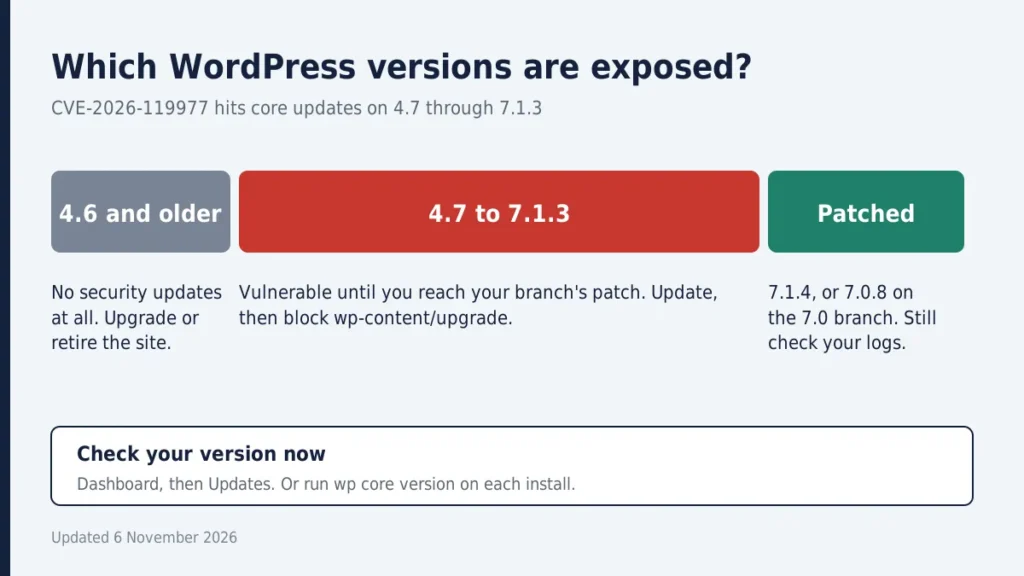
If you’ve run any version from 4.7 to 7.1.3 and your site did a full-package core update, treat it as in scope. An attack needs several things to line up: a full-package update, enough time before cleanup finishes, and public web access to that staging folder. That’s one reason the severity score carries a “high complexity” flag. It isn’t a point-and-click hack. But hard isn’t impossible, and plenty of people are trying.
Version status
| Your version | Status | What to do |
| 4.7 to 7.1.3 (before your branch’s patch) | Vulnerable | Update to the patched release |
| 7.1.4 | Fixed | Verify, then check logs |
| 7.0.8 | Fixed on the 7.0 branch | Verify, then check logs |
| 4.6 and older | No security updates at all | Upgrade or retire the site |
Older branches got backported fixes too, so check the official release notes on WordPress.org for the exact number on your branch.
How serious is CVE-2026-119977, really?
Opinions differ. WordPress itself rated the issue low. Wordfence, the company that assigned the CVE, scored 8.1 out of 10 with high attack complexity. Both can be true: tricky to pull off, nasty when it works, and no login needed.
The attack numbers are real, though. The Hacker News reported Wordfence blocking 62,969 attempts in a single day, and the count was still above 12,000 a day on 4 November. One catch worth remembering: those are blocked attempts, not hacked sites. As of SecurityWeek’s 4 November update, Wordfence hadn’t reported any confirmed compromises.
So don’t panic. Don’t shrug it off either.
What to do right now: a four-step fix
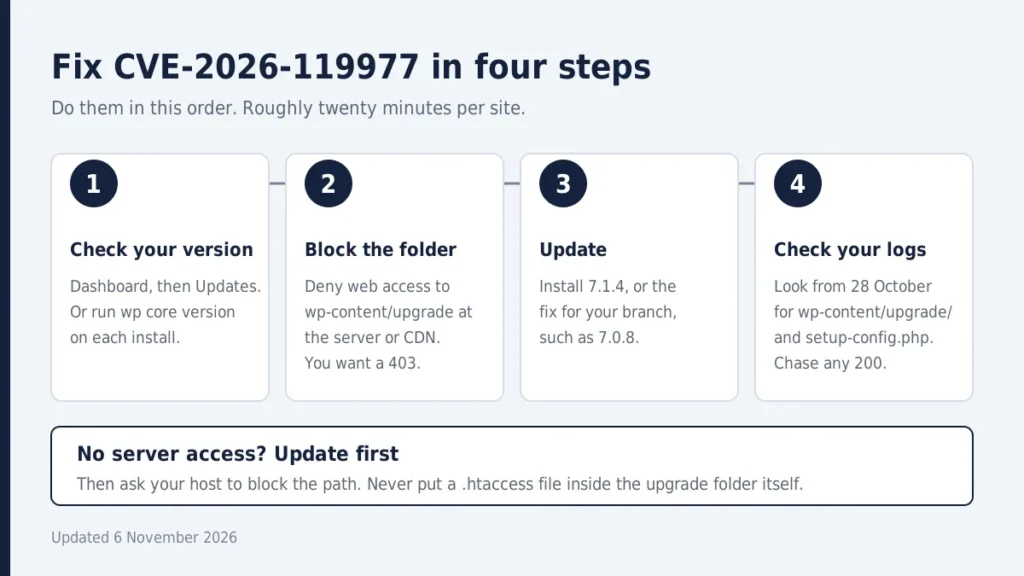
Do these in order. Once you’ve done the first site, the rest take maybe twenty minutes each.
Step 1: Check your version
Open Dashboard, then Updates. Security releases install in the background on sites that allow automatic updates, so many of yours probably updated themselves. “Probably” isn’t good enough, though. Look at each one. If you manage many sites, WP-CLI makes this quick: run wp core version on each install.
Step 2: Block public access to wp-content/upgrade
Do this at the server, virtual host or CDN level, ideally before your next core update runs. WordPress writes to that folder through the filesystem, so blocking it over HTTP shouldn’t stop updates. Test on one non-production site first, because some hosts handle paths differently.
[Code: Nginx]
location ^~ /wp-content/upgrade/ {
    deny all;
    return 403;
}
[Code: Apache]
RedirectMatch 403 ^/wp-content/upgrade(/|$)One trap: don’t put a .htaccess file inside the upgrade folder itself. The update cleanup empties that directory, so your rule would vanish. Afterwards, visit /wp-content/upgrade/ in a browser. You want a 403, not a file listing.
Step 3: Update to 7.1.4
Go to Dashboard, Updates and apply 7.1.4, or the fixed release for your branch. The fix for CVE-2026-119977 randomises the staging folder name, adds an index guard, and blocks unsafe handling of staged configuration data. The same release also patches several cross-site scripting issues, so updating helps beyond this one bug.
Step 4: Check your logs and your site
See the section further down. Don’t skip it. Updating closes the door, but it doesn’t tell you whether someone already walked through.
- You control the server or CDN: block the folder, then update.
- Shared hosting with no server access: update now, then ask your host to block the path.
- Many sites on old versions: script the block across all of them, then update in batches.
Wordfence’s argument is the practical one. Most site owners can’t edit server config in a hurry, and waiting for that leaves them exposed to everything else fixed in the release. I lean the same way for non-technical owners: don’t let a config change you can’t make stop an update you can.
Will a security plugin protect you?
Not on its own. The exploit asks for a staged PHP file directly, without ever loading WordPress, so a firewall that runs inside WordPress may never see the request. Wordfence advises switching on its Extended Protection mode so the firewall loads before everything else.
Also note that free Wordfence users get the new firewall rule on 27 November, about 30 days after paid users. If you’re on the free tier, don’t wait for that. Update and block the folder yourself.
How to tell if someone already tried
Start with your access logs. Look from 28 October forward for requests containing wp-content/upgrade/ or setup-config.php. A 200 response is the one to chase. Most of the rest is probably scanner noise.
Then look at the site itself for these signs:
- Admin accounts you don’t recognise
- Plugins you never installed
- PHP files you didn’t put there
- A wp-config.php that points at a database host you don’t run
If any of that shows up, put the site in maintenance mode and copy the files, database and logs before you change anything. Then rotate secrets: database password, salts, API keys. Updating core won’t clean a site that’s already been tampered with, and a login to the wrong database host means every change since the update is suspect.
A note for agencies and freelancers
Clients don’t want a CVE lecture. They want to know if they’re safe. Keep a simple sheet with site, version, host, date checked and result, then send a short message like this one.
“Hi Alex, WordPress released a security update on 28 October that fixes a flaw attackers are actively targeting. We’ve checked your site. It’s now on [8.6], and we found nothing unusual in the logs since that date. You don’t need to do anything. If that changes, we’ll tell you straight away.”
And don’t forget the forgotten sites: old staging copies, dev installs, that microsite from three years ago. They’re often the ones nobody updates.
Common mistakes to avoid
- Assuming auto-updates worked without checking
- Dropping the block rule inside the upgrade folder
- Relying on a firewall plugin alone
- Skipping staging and legacy sites
- Mixing this up with WP2Shell, a separate pair of flaws (CVE-2026-63030 and CVE-2026-60137) from July, fixed in 6.9.5 and 7.0.2. Different bug, different fix.
Frequently asked questions
Is CVE-2026-119977 being exploited?
Yes. CISA lists it as exploited, and Wordfence has been blocking thousands of attempts a day. No confirmed compromises had been reported as of 4 November, but that can change.
Do I have to block the folder before updating?
It’s the safest order if you control the server. If blocking would delay the update, update first and block afterwards.
Did my site update by itself?
Maybe. Many sites did. Check Dashboard, then Updates, and confirm the version instead of assuming.
Is this the same as WP2Shell?
No. WP2Shell was a different chain of flaws disclosed in July. CVE-2026-119977 is the update-window bug fixed in 7.1.4.
Is updating enough?
It closes the hole, but it doesn’t remove an intruder who got in earlier. Check your logs and accounts .
Discover more from Diginatives
Subscribe to get the latest posts sent to your email.