The world of webcomics has expanded tremendously over the past few decades, offering artists a dynamic and accessible platform to share their stories. However, while creativity and artistry are at the heart of webcomics, the role of technology especially coding and Essential software skills cannot be overlooked. In today’s digital landscape, developing the right software skills for webcomic artists can streamline your work, enhance your storytelling, and even help you create interactive elements for your audience.
If you’re a webcomic artist aiming to push boundaries and stay competitive, here are the essential software skills you need to create professional, engaging webcomics in 2026.
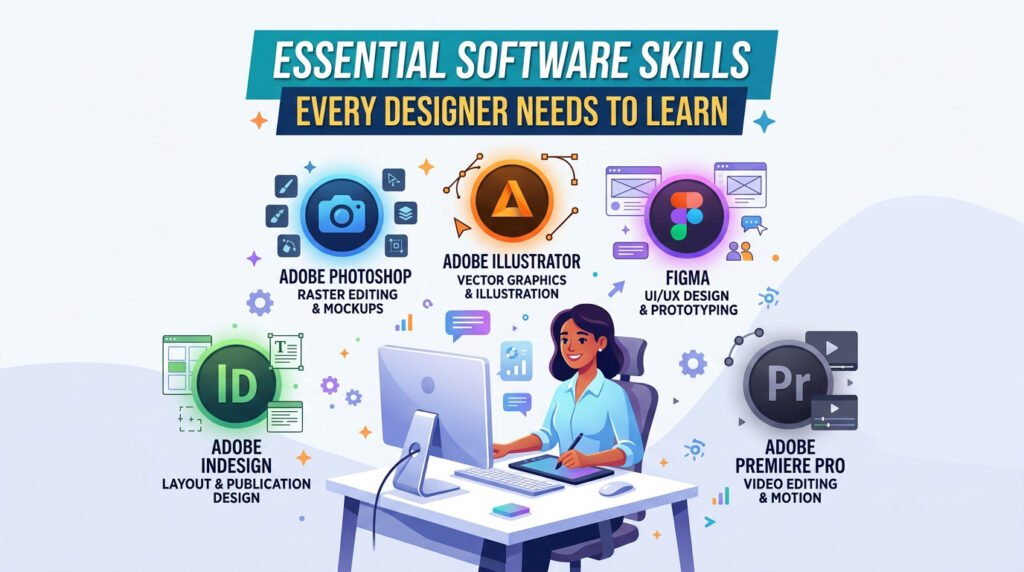
Essential Software Skills Every Designer Needs to Learn
1. Basic Image Editing and Digital Drawing Skills
Before diving into coding, the foundation for any webcomic artist lies in mastering digital drawing software. Programs like Adobe Photoshop, Clip Studio Paint, Procreate, and Krita are industry standards for creating webcomic illustrations.
Why It Matters:
Understanding these tools allows you to efficiently manage layers, apply special effects, manipulate colors, and create clean, scalable artwork. Mastering image editing not only makes your comics look professional but also helps streamline the production process.
- Photoshop: Known for its extensive toolset and professional features, Photoshop allows webcomic artists to work with complex layers, brushes, and effects that make illustrations pop.
- Clip Studio Paint: A favorite among comic artists, it offers specialized tools for line art, panel creation, and text bubbles, making it perfect for webcomics.
- Procreate: Favored by many iPad users, Procreate is a powerful, portable drawing tool with an intuitive interface that rivals desktop apps.
2. Understanding Web Formats and File Optimization
Once you’ve created your comic, understanding how to optimize images for the web is crucial. Many creators overlook this step, resulting in large file sizes and slower load times on their websites, which frustrates readers.
Essential Software Skills Concepts:
- JPEG, PNG, and GIF: These are the three main image formats for the web. Knowing the pros and cons of each will help you choose the best one for your comic.
- JPEG: Best for colorful, detailed images but can lose quality due to compression.
- PNG: Supports transparency and better image quality but tends to have larger file sizes.
- GIF: Limited to 256 colors but supports animation, making it ideal for short, looping scenes.
- File Compression: Tools like TinyPNG or ImageOptim can reduce file sizes without sacrificing too much quality, ensuring your comics load faster online. Understanding how to compress images without losing resolution is key for a smooth web experience.
3. HTML and CSS: The Building Blocks of Your Webcomic
Every webcomic needs a home on the internet, and learning the basics of HTML (Hypertext Markup Language) and CSS (Cascading Style Sheets) lets you customize your website’s layout and appearance without relying on templates or expensive web developers.
Why It Matters:
While platforms like Webtoon or Tapas let you publish comics without any coding knowledge, having control over your own website gives you more creative freedom and the ability to present your work exactly how you envision it.
- HTML: The structure of your webcomic page. With HTML, you control the order of elements, such as where your comic panels, navigation buttons, or social media links appear.
- CSS: This dictates how your webcomic looks. By learning CSS, you can change fonts, adjust layouts, customize colors, and optimize the reading experience across devices.
For artists with little coding experience, platforms like WordPress and Squarespace offer built-in support for custom HTML and CSS, giving you more flexibility in design without starting from scratch. If you’re launching a portfolio site alongside your comic, it’s also worth browsing a few web developer portfolio templates to see how other creators structure their sites.
4. JavaScript for Interactive Elements
Taking your webcomic to the next level may involve adding interactive elements, such as animated panels, hover effects, or sound integration. JavaScript is the coding language responsible for adding dynamic functionality to your website.
Why It Matters:
JavaScript opens the door to a more immersive experience for your readers. For example:
- Interactive Panels: Make specific panels clickable, revealing extra content or letting readers navigate in unique ways.
- Animations: Adding animations between scenes can enhance the storytelling flow.
- Interactive Features: Add things like voting buttons to let readers influence the direction of the story.
Learning the basics of JavaScript can significantly enhance the user experience, making your webcomic stand out.
5. Content Management Systems (CMS)
Managing a webcomic involves more than just posting artwork. Webcomic artists should be familiar with Content Management Systems (CMS) like WordPress, Drupal, or ComicPress (a webcomic-specific plugin for WordPress) to easily organize and publish their work.
Why It Matters:
A CMS streamlines the process of uploading new content, managing archives, and structuring your site. Using a platform like WordPress with the Comic Easel plugin enables you to:
- Schedule updates in advance.
- Automatically format new posts for your comics.
- Offer reader-friendly navigation with tools for finding specific strips or story arcs.
With a user-friendly interface, a CMS lets you focus on creating content rather than spending too much time on technicalities.
6. Version Control with Git
Creating webcomics is a continuous process that involves frequent updates and revisions. This is where a tool like Git becomes invaluable. Git is a version control system that tracks changes to your files over time, making it easier to manage different versions of your comic and collaborate with others.
Why It Matters:
For solo creators, Git ensures you never lose track of your work, especially if you make major changes and need to revert to an earlier version. For collaborative projects, Git allows multiple artists, writers, or colorists to work on the same project without overwriting each other’s contributions.
Services like GitHub or GitLab offer free repositories to host your project files, track progress, and collaborate effectively.
7. SEO (Search Engine Optimization) for Webcomic Visibility
It’s one thing to create a great webcomic, but it’s another to ensure people find it. Knowing the basics of SEO will help your comic rank higher in search results, attracting more readers.
Why It Matters:
- Keywords: Using relevant keywords in your titles, descriptions, and blog posts related to your comic helps search engines understand what your content is about.
- Alt Text for Images: Adding descriptive alt text to your comic images ensures they appear in search engine results, potentially bringing in traffic from image searches.
- Mobile Optimization: Search engines like Google prioritize mobile-friendly websites. Optimizing your webcomic for mobile ensures a better experience for readers and can improve your search rankings.
8. Monetization Tools
If you’re planning to turn your webcomic into a source of income, knowing how to implement monetization strategies through your website is key. Understanding tools like Patreon, Ko-fi, or PayPal donations can provide direct financial support from your readers. Learning to integrate Google AdSense or run your own merch store many creators use platforms similar to the ones covered in this guide to ecommerce website design can also generate passive income from your site traffic.
Why It Matters in Essential Software Skills
Monetizing your webcomic helps you sustain your creative efforts. By integrating payment portals, ads, or exclusive content for paying subscribers, you create a revenue stream that lets you focus more on your art and storytelling. The moment you start collecting payments or reader data, though, security stops being optional even a small, single-artist site is a target. It’s worth understanding some basic API and platform security practices so your payment integrations and reader accounts stay protected.
9. AI Tools and Assistants for Webcomic Artists (new for 2026)
AI-assisted tools have quietly become part of most working artists’ pipelines not to replace the art, but to speed up the repetitive parts of it. Line-art cleanup, color-flatting, background generation, and even dialogue/script polishing all have solid AI-assisted options now, and understanding where these tools fit into your workflow can save hours per page.
Why It Matters:
- Speed without losing your style: Most artists use AI tools for backgrounds, flats, or upscaling — the parts of the process that don’t carry your unique linework while keeping full control over characters and key panels.
- Workflow automation: Beyond art itself, creators are automating the repetitive admin side of running a webcomic cross-posting to multiple platforms, resizing images for different sites, scheduling releases. This is the same logic behind broader workflow automation and hyperautomation trends businesses are adopting it applies just as well to a one-person comic studio.
- Know the trade-offs: Platforms like Webtoon and Tapas have their own policies on AI-assisted content, so it’s worth checking platform rules before leaning on these tools for anything beyond your own workflow.
10. Basic Website Security for Creators (new for 2026)
As more artists run their own sites, sell merch, and host paid subscriber content, their websites become a genuine target not because they’re famous, but because small, under-protected sites are easy targets for automated attacks.
Why It Matters:
- Protect your CMS login: Weak WordPress or Drupal admin credentials are one of the most common ways small creator sites get compromised.
- Watch for suspicious traffic: A sudden spike in odd traffic patterns can be an early sign of a botnet attack targeting your site worth knowing what to look for even if you’re not running a large platform.
- Keep plugins and integrations updated: Every payment gateway, comment plugin, or third-party embed you add is a potential entry point. Regular updates and a basic SaaS security checklist go a long way for a solo creator who doesn’t have an IT team.
Conclusion: Blending Creativity and Coding
Coding might seem like a world away from drawing, but in today’s digital era, strong Essential software skills for webcomic artists are essential for anyone looking to succeed. By learning how to navigate the technical side of webcomic creation from HTML and CSS to file optimization, AI-assisted workflows, and basic security artists can take greater control of their work and improve the reading experience for their audience. Embracing coding and modern tools alongside your creativity can elevate your webcomic from a simple project to a professional-level production, helping you stand out in a competitive market.
Frequently Asked Questions (FAQs)
Do webcomic artists need to know how to code?
Not strictly platforms like Webtoon and Tapas let you publish without any coding knowledge. But basic HTML, CSS, and SEO skills give you far more control if you want your own website and audience outside those platforms.
What Essential software skills are most important for a beginner webcomic artist?
Start with digital drawing software (Procreate, Clip Studio Paint, or Photoshop) and basic image optimization. HTML/CSS and SEO can come later once you’re ready to build or customize your own site.
Should webcomic artists use AI tools in 2026?
Many do, mainly for backgrounds, color-flatting, and workflow automation rather than replacing core artwork. Always check the AI-content policy of whichever platform you publish on before relying on these tools heavily.
How can webcomic artists monetize their work safely?
Patreon, Ko-fi, and AdSense are common starting points. Once you’re collecting payments or reader data, basic website security strong CMS credentials, updated plugins, and monitoring for unusual traffic becomes just as important as the monetization setup itself.
Discover more from Diginatives
Subscribe to get the latest posts sent to your email.